

Factors and labels#
A factor turns the (timestamp, symbol) price panel of a dataset into a panel
of engineered features of the same shape. A label is a factor shifted forward
in time: the value a model learns to predict. This page covers the two
computation backends, computing and storing factors, the built-in factor
bundles, reading whole-market stores on a universe, normalisation and
neutralisation, resampling and the factor calendar, chunked builds, labels,
streaming and factor reports. Read it after Datasets and before
Models.
Factors, labels and panels#
Every variable of a factor panel is one feature, such as a five-day return or
a volatility estimate, held as a [timestamp, symbol] array. A label panel
has the same shape and holds, at each (timestamp, symbol), the value to
predict there, usually the return of the next few bars.
Every factor derives from Factor and is
built from a frozen config dataclass. The fields both backends share live on
BaseFactorConfig:
warmup_bars: bars of history, counted on the dataset’s own calendar, thatcompute(start, end)reads beforestart, so rolling computations have a full window on the first requested bar;dataset: the dataset the factor reads, or a list of datasets it merges (see Merge several datasets);file_path: the Zarr storebuildwrites andreadreads;factor_names: the outputs to produce; leftNone, every name the class can produce;kwargs: free-form options a particular class reads, such as a horizon.
The config says what is computed, not when: the date range is an argument of
compute, build and read, and none of them changes the factor’s config or
its dataset’s. get_config() returns a dict that
rebuild() turns back into an equal factor.
Choosing a backend#
Config class |
||
Logic |
a graph of KunQuant operators, compiled to native code |
a Polars lazy expression chain |
Modes |
batch ( |
batch only |
Input column names |
the shared names, listed in |
the store’s own names; the shared names over a merged input |
Output dtype |
float32 |
float64 |
Cost |
compiles each graph once, then loads it from a cache |
none |
KunQuant is the main backend. It runs the same compiled graph over a whole history in batch mode or one bar at a time in streaming mode, so a factor validated in a backtest runs unchanged on live data, and it has the rolling and cross-sectional operators the built-in libraries are built from. Compilation needs a C++ compiler. Polars is the lighter path for research factors that only ever run in batch, or whose computation is awkward as an operator graph. Both produce the same kind of panel, so a model takes factors from both at once.
A price store to follow along#
The examples share one small synthetic US-equity store with eight symbols and
120 business days, laid out as the Tiingo converter writes it: raw open,
high, low, close and volume, plus the split-adjusted adjOpen to
adjVolume.
import numpy as np
import pandas as pd
import xarray as xr

from quantlab.dataset.config import DatasetConfig
from quantlab.dataset.stock import StockDataset

rng = np.random.default_rng(0)
symbols = [f"S{i:02d}" for i in range(8)]
dates = pd.bdate_range("2024-01-01", periods=120)
close = 50 * np.exp(np.cumsum(rng.normal(0, 0.02, (120, 8)), axis=0))
volume = rng.uniform(1e5, 1e6, (120, 8))
fields = {"open": close * 0.995, "high": close * 1.01, "low": close * 0.99,
          "close": close, "volume": volume}
fields |= {"adj" + k.capitalize(): v for k, v in fields.items()}   # adjOpen, ...
xr.Dataset({k: (("timestamp", "symbol"), v) for k, v in fields.items()},
           coords={"timestamp": dates, "symbol": symbols}).to_zarr("prices.zarr", mode="w")

price_config = DatasetConfig(zarr_file_path="prices.zarr", raw_data_dir_path="raw",
                             market="us_equity", frequency="1d")
dataset = StockDataset(price_config)
The store ends on 14 June 2024. One dataset object can feed several factors:
a factor asks it for a date range with dataset.panel(start, end).
Compute a factor#
Compute three Alpha158 features from February to the end of the store:
from quantlab.factor.config import FactorConfig
from quantlab.factor.predefined.alpha158 import Alpha158Stock

alpha = Alpha158Stock(FactorConfig(
    warmup_bars=20,
    dataset=dataset,
    mode="batch",
    data_columns=("adjOpen", "adjHigh", "adjLow", "adjClose", "adjVolume"),
    factor_names=("KMID", "ROC5", "STD20"),
    file_path="factors/alpha158.zarr",
    njobs=4,
))
panel = alpha.compute("2024-02-01", "2024-06-14")
print(dict(panel.sizes), list(panel.data_vars))
print(int(panel["STD20"].isel(timestamp=0).isnull().sum()))
print(dataset.bar_before("2024-02-01", 20))
{'timestamp': 97, 'symbol': 8} ['KMID', 'ROC5', 'STD20']
0
2024-01-04 00:00:00
The panel starts on the requested 1 February. The inputs were read from
4 January, twenty bars earlier on the dataset’s calendar, so STD20 already
has a full window on the first bar and none of its values there is NaN. When
the dataset holds fewer bars before start than warmup_bars, compute
warns with the shortfall and starts from the first bar there is. njobs sets
the executor threads. Pinning factor_names keeps the compiled graph small;
unpinned, factor_names resolves to all 169 Alpha158 names. A model trains on
exactly the pinned names.
compute holds nothing: every call reads the dataset and runs the factor
again (the compiled library is cached).
Build and read a factor store#
build(start, end) computes a range once, writes it to config.file_path as
a Zarr store with one array per factor and records the range beside it.
read(start, end) then opens the store lazily and returns any range inside
the recorded one. extend(end) computes the bars after the recorded range,
warmed from the dataset’s history, and appends them; the store’s time, symbol
and variable axes widen as needed:
alpha.build("2024-02-01", "2024-05-31")
print(alpha.store_range())
print(dict(alpha.read("2024-03-01", "2024-03-29").sizes))

try:
    alpha.read("2024-05-01", "2024-06-14")
except ValueError as e:
    print(e)

alpha.extend("2024-06-14")
print(alpha.store_range())
print(dict(alpha.read("2024-02-01", "2024-06-14").sizes))
('2024-02-01', '2024-05-31')
{'timestamp': 21, 'symbol': 8}
Alpha158Stock.read(): the store at factors/alpha158.zarr covers 2024-02-01 to 2024-05-31, which does not contain 2024-05-01 to 2024-06-14. Extend it with extend(end) or rebuild it with build(start, end).
('2024-02-01', '2024-06-14')
{'timestamp': 97, 'symbol': 8}
rewind(end) is the inverse of extend: it drops the bars after end and
moves the recorded end back, so the next extend computes them again (for
bars computed from inputs that were wrong). read and extend refuse a store
that build did not write. read(start, end, symbols=[...]) keeps only those
symbols, in the order given.
A store is written by its owner only, the factor whose outputs are every
variable of it. A factor pinned with factor_names to some outputs of a
shared store reads it, and its build and extend raise rather than replace
the store with a subset. A factor declares the stores it owns or reads with
store_uses(), which is what the daily data update and the
live day extend.
A model chooses between computing and reading with factor_data_strategy and
label_data_strategy: "cal" computes every factor over the model’s range,
"read" reads the stores built earlier (see Models).
Built-in factors#
Class |
Backend |
What it computes |
|---|---|---|
Polars |
|
|
KunQuant |
the 101 formulaic alphas of Kakushadze (2016) |
|
KunQuant |
the 169 features of Qlib’s Alpha158: candle shapes ( |
|
KunQuant |
Fama-French three-factor residual momentum, from a Fama-French CSV or from series on the panel |
|
KunQuant |
USE4-style exposures to 12 styles, their descriptors and the estimation-universe mask (see Barra style factors) |
|
KunQuant |
eight literature characteristics, raw and ranked (below) |
|
KunQuant |
short-horizon reversal, low MAX, turnover-conditioned momentum, abnormal volume, overnight and intraday returns |
|
KunQuant |
23 accounting, 13F and insider characteristics, reports lagged by fiscal period |
|
KunQuant |
short selling, news, 8-K events and 10-K text changes |
|
KunQuant |
20 daily anomalies: calendar effects, coskewness and downside beta, investor behaviour, corporate actions, listing age |
|
KunQuant |
session statistics of one-minute bars, their trailing means, and rank composites of them |
|
xarray |
21 return and amount features per index or ETF series, the same for every symbol with a bar |
|
xarray |
each symbol’s rolling OLS beta on a single-symbol benchmark |
|
xarray |
an index’s capitalization weights from point-in-time membership |
Each class docstring shows its config and the columns it reads. A few notes:
The
SpotKlinevariants z-score every output along time overkwargs["zscore_window"]bars (default 20), which suits strategies that follow one asset;warmup_barsmust cover the alpha’s lookback pluszscore_window - 1. TheStockvariants z-score across the symbols of each bar, and a symbol with no bar that day (not yet listed or delisted) is NaN in every output, so it enters neither the ranks nor the z-score. US-equity stores have no dollar-volume column, so theStockvariants use the typical price(adjHigh + adjLow + adjClose) / 3as VWAP.FundamentalAlpha,AlternativeAlphaandDailyAnomalyAlphaare signed so that higher predicts higher return;kwargs={"ranked": True}gives whole-market ranks, the inputNeutralizedFactorshould wrap. Theirdata_columnsmust be the columns their parameters name (for exampleDAILY_ANOMALY_COLUMNS). All three are batch only.MarketFeaturesgives every stock the market inputs the MASTER model uses. ItsMarketFeatureConfigtakes the stock dataset asdatasetand aseriesdict of single-symbol datasets; values go to every symbol that has a bar on the date, so a symbol not yet listed stays NaN.MASTERRegressortakes the factor’s names as itsgate_features.BenchmarkBeta’s one output,beta, is the exposure a mean-variance book holds near 1 with exposure bounds, andMembershipCapWeight’sbenchmark_weightis the book the active-risk optimizer prices active risk against (see Portfolio construction).
Literature-backed equity alpha bundle#
LiteratureAlpha, contributed by Jerry,
emits a raw value and a cross-sectional rank (<stem>_raw, <stem>_rank) of
eight characteristics: 52-week-high proximity, short-term reversal, low MAX,
low idiosyncratic volatility, Amihud illiquidity, gross profitability,
conservative asset growth and standardized unexpected earnings; the class
docstring defines each and cites its paper. Selecting a subset with
factor_names prunes unrelated formulas and the columns they need. The data
layer owns point-in-time correctness: accounting fields become visible only
after their filing is public, and the earnings columns freeze the actual EPS,
the consensus before the announcement and the scale price at the event.
Compute on the whole market, read on a universe#
Cross-sectional factors (ranks, z-scores, neutralisation) are computed on the whole-market store of common stocks and read on a universe. A roster store, the set of every symbol ever a member, would mix future members into early cross-sections and change the factor’s history whenever the index changes. Two wrappers then read the whole-market store for one universe:
RosterFactorkeeps the symbols of a roster dataset.readreads only those symbols;computecomputes on the whole dataset and cuts afterwards.MembershipMaskedFactorsets a cell to NaN wherever the symbol is not a member on the bar’s own date. A cross-sectional model (GATs, MASTER) takes every symbol with a finite feature attas context, so without the mask its cross-section attwould hold symbols that join the index later. The mask goes on the computed factor, never on the prices, so a symbol that joins atthas a value attfrom its full price history.
from quantlab.factor.config import MembershipMaskedFactorConfig, RosterConfig
from quantlab.factor.predefined.membership_mask import MembershipMaskedFactor
from quantlab.factor.predefined.roster import RosterFactor

features = MembershipMaskedFactor(MembershipMaskedFactorConfig(
    factor=RosterFactor(RosterConfig(factor=alphas, roster=membership)),
    membership=membership,
))
Labels and predictions are masked by the same rule, with
MembershipMaskedLabel
and MembershipMaskedPredictor;
prices are not masked by membership, only through
BadPrintMaskedDataset for bad prints.
See Universes for rosters and membership.
StartClippedFactor
moves the start of read and compute to the first day of the wrapped
store, for a factor whose inputs start late (the minute-bar factors start in
2016) in a model that trains from 2000; the model’s merged panel is NaN on
the earlier bars. The wrappers nest: wrap StartClippedFactor(StartClippedConfig(factor=hf))
in the RosterFactor above.
All three are factor views (FactorView).
A view keeps no store of its own (store_path is None), answers
store_range(), store_uses() and the calendar with the wrapped factor’s,
and refuses build, extend and every other write. The outputs keep the
wrapped factor’s names, so a view takes the factor’s place in a model’s
factors. The store itself is extended by the unpinned factor that owns it.
Write your own factor#
A Polars factor subclasses FactorPolars and overrides
_get_factor_lazyframe, which receives the dataset as a polars.LazyFrame
and returns one with exactly timestamp, symbol and the factor columns.
The factor names are read from the returned schema:
import polars as pl
from quantlab.factor.config import PolarsFactorConfig
from quantlab.factor.polars import FactorPolars

class VolumeSurprise(FactorPolars):
    """Today's volume relative to its trailing mean, per symbol."""

    def _get_factor_lazyframe(self, lf: pl.LazyFrame) -> pl.LazyFrame:
        n = (self.config.kwargs or {}).get("n", 20)
        volume = pl.col("adjVolume")
        return (
            lf.sort(["symbol", "timestamp"])
            .with_columns(
                (volume / volume.rolling_mean(n).over("symbol") - 1.0)
                .alias(f"vol_surprise_{n}")
            )
            .select(["timestamp", "symbol", f"vol_surprise_{n}"])
        )

surprise = VolumeSurprise(PolarsFactorConfig(
    warmup_bars=10,
    dataset=dataset,
    kwargs={"n": 10},
    file_path="factors/vol_surprise.zarr",
))
print(surprise.get_factor_names())
print(dict(surprise.compute("2024-02-01", "2024-06-14").sizes))
('vol_surprise_10',)
{'timestamp': 97, 'symbol': 8}
Sort by symbol and time and use .over("symbol") so windows stay within one
symbol, end with the .select(...) (any column left in the frame is stored
as a factor), and spell columns as the store does.
A KunQuant factor subclasses FactorKunQuant and implements
_get_factor_names and _get_factor_func, which builds an operator graph
with one Input per entry of data_columns and one Output per factor name;
the next section has one. KunQuant operators look only backwards in time, so
a graph cannot read the future by accident. Extending quantlab
covers both backends in depth.
Normalise and neutralise#
WindowedZScore(x, window) in quantlab.factor.kunquant_ts compares
each symbol with its own trailing window bars; CrossSectionalZScore(x) in
quantlab.factor.kunquant_cs standardises each bar across symbols,
ignoring NaN. A strategy that ranks stocks against each other on the same day
wants the cross-sectional version; one that trades a single asset when it is
unusually high against its own history wants the time-series version. This
factor computes the close’s distance from its ten-day mean in all three
forms:
import KunQuant.ops as op
from KunQuant.Op import Builder, Input, Output
from KunQuant.Stage import Function
from quantlab.factor.kunquant import FactorKunQuant
from quantlab.factor.kunquant_cs import CrossSectionalZScore
from quantlab.factor.kunquant_ts import WindowedZScore

class MaDeviation(FactorKunQuant):
    """Distance of the close from its 10-day mean, raw and normalised."""

    def _get_factor_names(self):
        return ("ma_dev_10", "ma_dev_10_ts", "ma_dev_10_cs")

    def _get_factor_func(self):
        builder = Builder()
        with builder:
            close = Input("adjClose")
            dev = op.SubConst(op.Div(close, op.WindowedAvg(close, 10)), 1.0)
            Output(dev, "ma_dev_10")
            Output(WindowedZScore(dev, 20), "ma_dev_10_ts")      # along time
            Output(CrossSectionalZScore(dev), "ma_dev_10_cs")    # across symbols
        return Function(builder.ops)

ma_dev = MaDeviation(FactorConfig(
    warmup_bars=30, dataset=dataset, mode="batch",
    data_columns=("adjClose",), file_path="factors/ma_dev.zarr", njobs=4,
))
dev = ma_dev.compute("2024-02-15", "2024-06-14")
day = dev.isel(timestamp=-1)
print(round(day["ma_dev_10_cs"].mean().item(), 6), round(day["ma_dev_10_cs"].std(ddof=1).item(), 6))
print(np.round(day["ma_dev_10_cs"].values, 2))
-0.0 1.0
[ 0.3  -1.5  -0.93  1.12 -0.87  1.27  0.27  0.35]
The same modules hold the other operators the built-in bundles use:
cross-sectional outlier handling
(CrossSectionalWinsorize,
CrossSectionalTrim; a common chain
is CrossSectionalZScore(CrossSectionalWinsorize(v))), exponentially
weighted window statistics (EWMean,
EWBeta and relatives),
estimation-universe weighting and regressions
(CapWeightedStandardize,
CrossSectionalWLSResidual) and
CrossSectionalNeutralize.
Neutralise against industry and size#
NeutralizedFactor wraps a
factor and, on every bar, replaces each output by its residual from a
regression over every symbol on one intercept per industry plus a slope on the
log market cap, z-scored again across symbols. Its
NeutralizedConfig takes the wrapped
factor, an exposures dataset (one or a list merged) holding marketcap
and industry, and regressors (("industry", "size"), ("industry",) or
("size",)). A symbol whose exposure is missing on a bar is NaN there, which
includes a secondary share class with no market cap of its own under size
neutralisation. Unlike a view it has a store of its own, so build it and use
it in a model’s factors in place of the raw factor:
from quantlab.factor.config import NeutralizedConfig
from quantlab.factor.predefined.neutralized import NeutralizedFactor

# daily, industry: the Sharadar DAILY (market cap) and industry datasets
alpha158_neutral = NeutralizedFactor(NeutralizedConfig(
    factor=alpha158, dataset=[daily, industry],
    file_path=str(store_path(FACTORS, "alpha158_neutral")), njobs=16,
))
Rank a characteristic across the market before neutralising it, which is
what ranked=True on the alpha bundles gives. NeutralizedFactor is batch
only and cannot be resampled.
Merge several datasets#
dataset also takes a list of datasets. The factor merges them into one
MergedDataset: each input is renamed to
the shared variable names, then the inputs are outer-joined on timestamp and
symbol, NaN where an input has no value. This covers an index store plus an
ETF store (same variables, different symbols) and prices plus fundamentals
(same symbols, different variables). Warm-up is counted on the union of the
inputs’ calendars. A merge never picks a value by input order: a cell holding
a value in two inputs, or inputs on different bar spacings, raise
ValueError. A KunQuant factor over a merge lists the shared names in
data_columns (close, not Close); stream mode refuses a merge. Resample
the inputs before merging them.
Resample a factor and the factor calendar#
resample(freq, how) returns a copy of the factor whose compute, read and
build answer on coarser bars. The factor is still computed on its dataset’s
own bars and only the output is aggregated, so a minute-bar momentum becomes
a daily series of the last minute’s value. freq and how take the values of
the dataset’s resample (see Datasets):
>>> import numpy as np, pandas as pd, xarray as xr
>>> from quantlab.dataset.config import DatasetConfig
>>> from quantlab.dataset.spot import SpotKlineDataset
>>> from quantlab.factor.config import PolarsFactorConfig
>>> from quantlab.factor.predefined.momentum import Momentum
>>> minutes = pd.DatetimeIndex(np.concatenate([
...     pd.date_range(f"2024-01-0{d} 00:00", periods=4, freq="min").values for d in (2, 3)
... ]))
>>> minute_close = np.arange(1.0, 9.0)[:, None] * np.array([[1.0, 10.0]])
>>> _ = xr.Dataset(
...     {"Open": (["timestamp", "symbol"], minute_close - 0.5),
...      "Close": (["timestamp", "symbol"], minute_close),
...      "Volume": (["timestamp", "symbol"], np.ones((8, 2)))},
...     coords={"timestamp": minutes, "symbol": ["AAAUSDT", "BBBUSDT"]},
... ).to_zarr("data/minute_klines.zarr", mode="w")
>>> minute_config = DatasetConfig(raw_data_dir_path="downloads/spot",
...                               zarr_file_path="data/minute_klines.zarr",
...                               market="crypto_spot", frequency="1m")
>>> minute = Momentum(PolarsFactorConfig(
...     warmup_bars=1, dataset=SpotKlineDataset(minute_config),
...     file_path="data/factors/minute_momentum.zarr", kwargs={"n": 1},
... ))
>>> daily = minute.resample("1d", "last")
>>> daily.compute("2024-01-02", "2024-01-03")["momentum_1"].to_pandas().round(3)
symbol      AAAUSDT  BBBUSDT
timestamp
2024-01-02    0.333    0.333
2024-01-03    0.143    0.143
>>> daily.store_path
'data/factors/minute_momentum_resample_1d.zarr'
build() on the copy writes its own store beside the source store; read()
opens that store when it exists and otherwise resamples the source factor’s
store on read. The built resampled store is a cache: rebuilding the source
factor does not refresh it. To compute a factor on already-resampled bars
instead, give the factor a resampled dataset.
A factor answers for its own bars, the factor calendar, through
calendar(),
bar_before() and
bar_after(), with the rules of the
dataset methods of the same names. A factor that is not resampled answers with
its dataset’s calendar; a resampled factor answers with its resampled bars, so
a daily factor computed from minute bars moves by trading days:
>>> daily.calendar("2024-01-02", "2024-01-03")
DatetimeIndex(['2024-01-02', '2024-01-03'], dtype='datetime64[ns]', freq=None)
>>> minute.bar_before("2024-01-03", 1), daily.bar_before("2024-01-03", 1)
(Timestamp('2024-01-02 00:03:00'), Timestamp('2024-01-02 00:00:00'))
>>> minute.bar_after("2024-01-02", 1), daily.bar_after("2024-01-02", 1)
(Timestamp('2024-01-02 00:01:00'), Timestamp('2024-01-03 00:00:00'))
A wrapper answers with the calendar of the factor it wraps, never with its own
dataset’s: a RosterFactor over daily gives the daily bars, and
NeutralizedFactor the neutralised factor’s bars, not its exposures’. A
factor over a merged dataset answers with the union calendar. warmup_bars
alone is counted on the dataset’s calendar, because it says how much input to
read.
Build a store that does not fit in memory#
ChunkedBuilder builds and extends a
factor’s own store one chunk of time at a time. It is a build tool, not a
factor: it writes only through the factor’s public write entries, and a model
reads the factor itself. With granularity=None it computes the range whole
when its peak fits in half the available memory and otherwise cuts it at the
coarsest period ("year" down to "hour") whose largest chunk fits. The
first chunk is the factor’s build, each later one its extend, so a build
that fails part way keeps the finished chunks and extend(end) resumes it.
Joined, the chunks equal the whole range computed at once to within
float32 tolerance.
from quantlab.factor.chunking import ChunkedBuilder
from quantlab.factor.config import FactorConfig
from quantlab.factor.predefined.alpha158 import Alpha158Stock

alpha158 = Alpha158Stock(FactorConfig(
    warmup_bars=400, dataset=RosterDataset(sep, membership), mode="batch",
    data_columns=("adjOpen", "adjHigh", "adjLow", "adjClose", "adjVolume"),
    file_path="factors/alpha158.zarr", njobs=32,
))
ChunkedBuilder(alpha158).build("2016-01-01", "2026-10-02")
features = alpha158.read("2026-01-02", "2026-10-02")
On us3000 (3103 bars x 7625 symbols, yearly chunks) this build peaked at
3.0 GB against 13.8 GB whole. workers computes several chunks at once in
worker processes while this process writes them in time order. Workers pay
off where a chunk’s time goes outside the factor’s own threads (reading,
decompressing, mapping minute bars); a factor whose time is in its KunQuant
graph already fills the cores with njobs. A resampled factor is chunked on
its source bars, never finer than its resampled bars.
The minute-bar factors are the main use. IntradayStats computes each
session’s statistics of the one-minute Massive bars (see
Massive): realised volatility and higher moments, jumps,
intraday and overnight returns, VWAP distance, order imbalance, volume shares
and trade size, each the statistic of the session so far. Resampled to "1d"
with "last" it is one value per stock and session; IntradayAverage
averages a stored factor over its last sessions. The daily store of ten
years of minute bars is built with
ChunkedBuilder(daily, granularity="month", workers=24), where daily is
IntradayStats(...).resample("1d", "last").
On the training server 24 workers of 4 threads built ten years of the S&P 500
roster’s minute statistics in 645 s. IntradayComposite combines trailing
means or coefficients of variation of stored outputs into equal-weight rank
composites, each part named "[-]<output>:<mean|cv>:<window>"; its ranks are
taken over every symbol of the wrapped panel, so build it on the whole market
and read it on a roster.
Labels#
Forward wraps any factor and places the
factor’s value at bar t + delay + span at bar t. Its
ForwardConfig takes:
factor: the factor to shift. Its value attmust use only bars up tot;Forwardrelies on this and cannot check it.span: the bars the label accumulates over, such as thenof ann-bar return.delay: the bars between the bar a signal forms on and the first bar the label counts, 1 by default, because a signal formed at the close of bartfills at the open of bart + 1.
delay + span is the label’s lookahead, lookahead_bars(). read and
compute ask the wrapped factor for lookahead bars past end, counted on
the factor calendar (a factor resampled to daily counts trading days), then
shift and trim back to the request. The label is therefore NaN at the end of a
range only where the later bars do not exist. A Forward owns no store:
build, extend and read act on the wrapped factor’s store, which then
serves as a feature and, wrapped, as a label.
Forward-return labels#
quantlab.label.predefined.fret provides three Forward subclasses
with span = n and delay = 1, reading adjOpen and taking n from
kwargs["n_forward_periods"]:
Return, the regression targetret_{n}: the return from the open of bart + 1to the open of bart + n + 1.BinaryReturn, the classification targetret_binary_{n}: 1.0 when that return is positive, 0.0 otherwise, NaN exactly whereReturnis NaN (an open inside the span is missing, or the later bars do not exist).Volatility,vol_{n}: the sample standard deviation of the one-bar open-to-open returns over the same opens, timessqrt(n), for a model that forecasts risk.
from quantlab.label.predefined.fret import BinaryReturn, Return

ret = Return(FactorConfig(
    warmup_bars=5, dataset=dataset, mode="batch",
    data_columns=("adjOpen",), kwargs={"n_forward_periods": 5},
    file_path="labels/ret_5.zarr", njobs=4,
))
print(ret.get_factor_names(), ret.span_bars(), ret.lookahead_bars())

labels = ret.compute("2024-02-01", "2024-05-31")
print(dict(labels.sizes), int(labels["ret_5"].isnull().sum()))

o = xr.open_zarr("prices.zarr")["adjOpen"]
t = o.get_index("timestamp").get_loc(pd.Timestamp("2024-05-31"))
print(float(labels["ret_5"].sel(timestamp="2024-05-31")[0]),
      float(o[t + 6, 0] / o[t + 1, 0] - 1))

tail = ret.compute("2024-06-01", "2024-06-14")
print(tail["ret_5"].isnull().all("symbol").values)

up = BinaryReturn(FactorConfig(
    warmup_bars=5, dataset=dataset, mode="batch",
    data_columns=("adjOpen",), kwargs={"n_forward_periods": 5},
    file_path="labels/up_5.zarr", njobs=4,
))
print(up.get_factor_names(), np.unique(up.compute("2024-02-01", "2024-05-31")["ret_binary_5"].values))
('ret_5',) 5 6
{'timestamp': 87, 'symbol': 8} 0
0.04027259349822998 0.04027256300341486
[False False False False  True  True  True  True  True  True]
('ret_binary_5',) [0. 1.]
The range ending on 31 May has no NaN: its last labels read the June bars, and the value on 31 May matches the hand computation up to float32 rounding. In the range ending on 14 June, the store’s last bar, the last six bars have no six later bars and are NaN.
Wrap any factor#
Any factor that uses only bars up to t becomes a label by wrapping it.
The label keeps the factor’s variable names, so the VolumeSurprise factor
above, wrapped, is the volume surprise five bars after the fill bar:
from quantlab.label.config import ForwardConfig
from quantlab.label.forward import Forward

future_surprise = Forward(ForwardConfig(factor=surprise, span=5))
The same surprise can be a feature of one model while future_surprise is
the label of another.
Mask a label by membership#
A model trained on an index masks its label with the index’s point-in-time
membership, judged at t only.
MembershipMaskedLabel
wraps a label computed on unmasked prices and sets a cell to NaN only where
the symbol is not a member on t’s own date. A symbol that leaves the index
inside the label’s horizon keeps its return at t; masking the prices
instead would drop the label wherever the symbol had left by the endpoint,
and since stocks usually leave an index after falling, that removes the
losers from the target (survivorship bias). A bar the membership panel does
not cover is refused. The wrapper owns no store and changes nothing else, so
it drops into a model’s labels and into analyze(frets=...) in place of
the label it wraps:
from quantlab.label.predefined.membership_mask import (
    MembershipMaskedLabel, MembershipMaskedLabelConfig,
)

label = MembershipMaskedLabel(MembershipMaskedLabelConfig(label=ret, membership=membership))
A model takes labels (anything with lookahead_bars()) only in its labels
and refuses them among its factors. At every split boundary it purges the
last L bars of the earlier segment, L being the largest lookahead among
its labels, so no label used for fitting reads a bar of the later segment. A
backtest refuses a label whose delay differs from its engine’s fill delay.
See Models and Backtesting.
Streaming mode#
In streaming mode a KunQuant factor is compiled for one bar at a time and
keeps its rolling state between calls; this is how a factor runs on live
data. Build the factor with mode="stream", pin the symbol list on the
dataset config, and feed one float32 array per input column to
cal_stream. Here the whole history is replayed, and the last streamed bar
matches the batch result of MaDeviation above:
from dataclasses import replace

stream_config = replace(price_config, symbols=tuple(symbols))
live = MaDeviation(FactorConfig(
    warmup_bars=30, dataset=StockDataset(stream_config), mode="stream",
    data_columns=("adjClose",), factor_names=("ma_dev_10", "ma_dev_10_ts"),
    njobs=4,
))
history = xr.open_zarr("prices.zarr")["adjClose"].values.astype("float32")
for step, row in enumerate(history):
    latest = live.cal_stream({"adjClose": np.ascontiguousarray(row)}, step, symbols)

print(dict(latest.sizes))
print(np.round(latest["ma_dev_10"].values[0], 4))
print(np.round(dev["ma_dev_10"].values[-1], 4))
{'timestamp': 1, 'symbol': 8}
[-0.0137 -0.0654 -0.049   0.0099 -0.0472  0.0142 -0.0145 -0.0122]
[-0.0137 -0.0654 -0.049   0.0099 -0.0472  0.0142 -0.0145 -0.0122]
cal_stream returns the panel of the bar it was fed; the stream is compiled
on the first call or with init_stream(). Every column in data_columns
must be used by one of the requested outputs, because KunQuant drops unused
inputs from the compiled stream. Polars factors, resampled factors and
factors over a merged dataset do not stream.
Analyse a factor#
analyze() reports how well a factor
orders symbols by their forward return, in the manner of alphalens. Pass one
or more forward-return labels as frets; every factor variable is paired with
every label variable. With data_strategy="read" both are read from their
stores instead of computed.
fwd = Return(FactorConfig(
    warmup_bars=5, dataset=dataset, mode="batch",
    data_columns=("adjOpen",), kwargs={"n_forward_periods": 1},
    file_path="labels/ret_1.zarr", njobs=4,
))
result = surprise.analyze("2024-02-01", "2024-05-31", frets=[fwd], quantiles=4,
                          output_dir="reports/vol_surprise")
print(list(result.pairs))
print(result.summary()[["factor", "fret", "ic", "rank_ic", "turnover"]].round(4))
['vol_surprise_10__ret_1']
            factor   fret      ic  rank_ic  turnover
0  vol_surprise_10  ret_1  0.0061   0.0118    0.7762
On random prices the IC is near zero, as it should be.
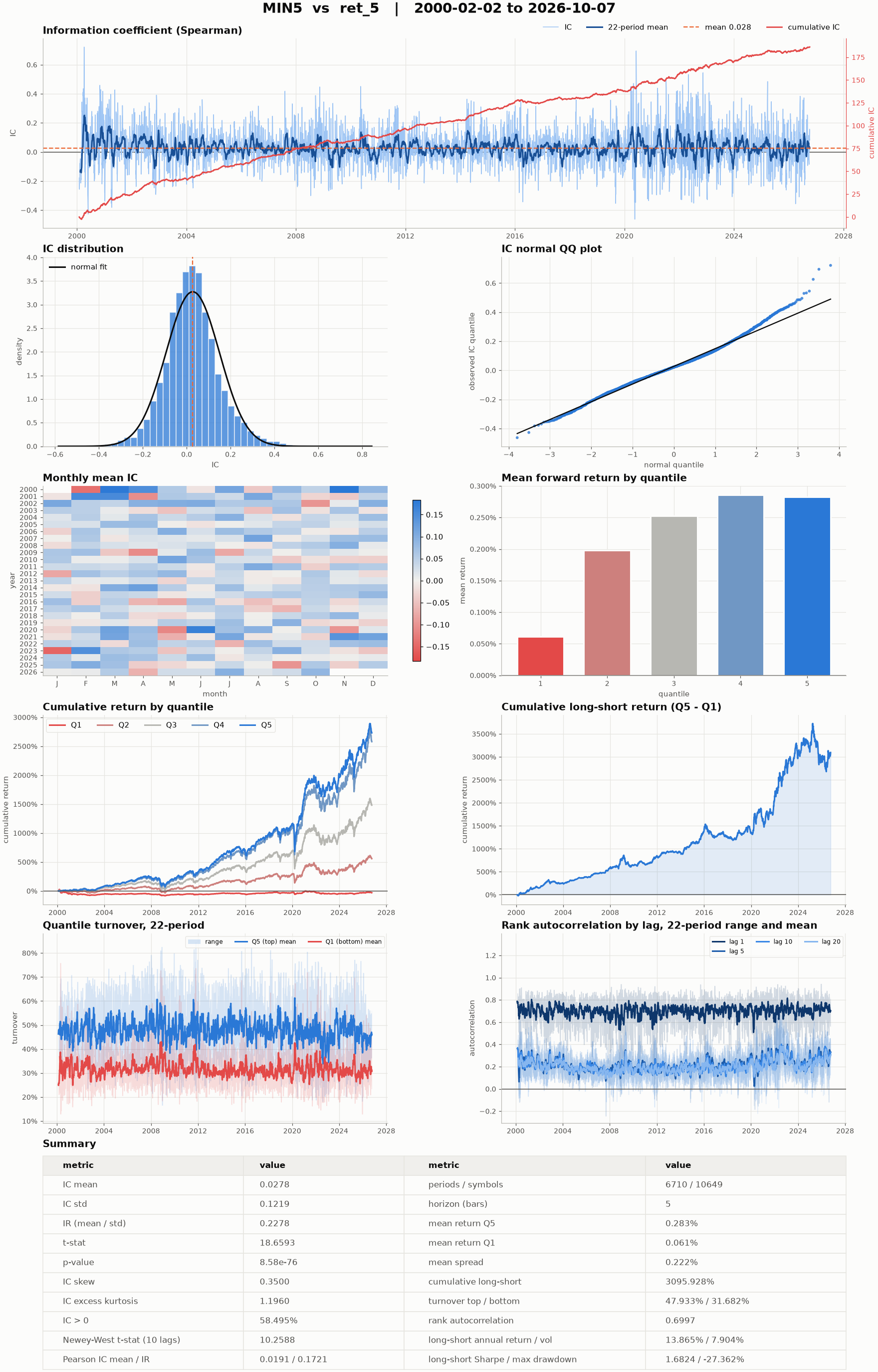
Each pair gets the information analysis (per-period rank IC and Pearson IC,
their mean, IR, t-statistic and a Newey-West t-statistic ic_nw_t_stat,
which is the one to read for a label spanning several bars), the returns
analysis (mean forward return per quantile, top-minus-bottom spread,
cumulative and annualised long-short statistics) and turnover (quantile
turnover and rank autocorrelation at several lags). With frets of several
horizons, ic_decay_table() lists the mean IC by horizon; read beside the
autocorrelation, it suggests a holding period. With two or more factor
variables the result also carries correlation, a
FactorCorrelation of the
variables’ rank correlations, clustered so near-duplicate factors fall
together.
With output_dir, the tables are written as CSV, the scalar metrics as
summary.json, one figure per pair as <factor>__<fret>.png, and the
factor’s and labels’ configs beside them. plot=False draws no figure, which
saves most of the time of a report over many factors.
FactorAnalyzer holds the
machinery and its options; its analyze_panels and
quantlab.api.analyze_factors() analyse panels that come from no
factor object.
Things to watch#
warmup_barscounts bars on the dataset’s calendar, so weekends and holidays are skipped, not counted. Set it to at least the longest lookback in the graph; a window nested in another needs the sum of both lengths.A KunQuant graph’s
Inputnames must matchdata_columns, which name variables of the store: a US-equity graph readsadjClose, notclose.A Polars factor that names a column its store lacks fails when the object is constructed, because the factor names are derived by running the expression on a few rows; the store must exist before you build the factor.
On macOS, batch mode pads the symbol axis to a multiple of 8 with all-NaN symbols and cuts them back, so any count runs; Linux needs no padding.
CrossSectionalZScoreis NaN on a bar with fewer than two valid values or zero spread, and a batch run must start at bar 0, whichcompute()always does.Compiled KunQuant libraries are cached in the process and on disk under
$QUANTLAB_KUNQUANT_CACHE, else$XDG_CACHE_HOME/quantlab/kunquant, else~/.cache/quantlab/kunquant; the key covers the graph, the compiler and the quantlab operator sources, so a change compiles again. Delete the directory to clear it.
See also#
Datasets for the panels factors read, and Universes for rosters and point-in-time membership.
Models for training on factors and labels.
Extending quantlab for writing factor classes.
The
quantlab.factorandquantlab.labelAPI reference.